Slabs are where most card scanners quietly give up. The raw cards scan fine, then you hold up a PSA 10 Charizard and the app either freezes, guesses wrong, or asks you to pay. The Rare Candy scanner reads graded slabs from PSA, CGC, BGS, and TAG for free, with no scan limit, and shows you an estimated value for that exact grade as soon as it recognizes the card.
Scan and track your Pokémon cards for FREE and rip digital packs backed by REAL cards with the Rare Candy App!
The short version:
Rare Candy scans PSA, CGC, BGS, and TAG slabs, and it's free with unlimited scans.
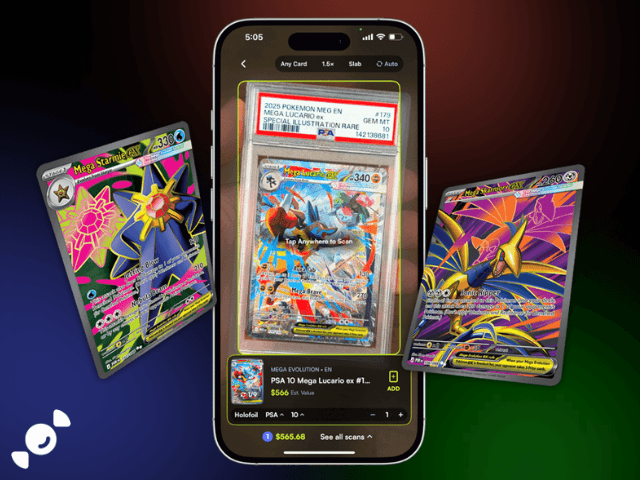
Switch the scanner from Raw to Slab mode, line up the slab, and the card, the grader, the grade, and an estimated value show up on screen.
In our side-by-side test of the top 5 Pokémon card scanner apps, it was hands down the best at graded cards.
Can you scan graded Pokémon cards?
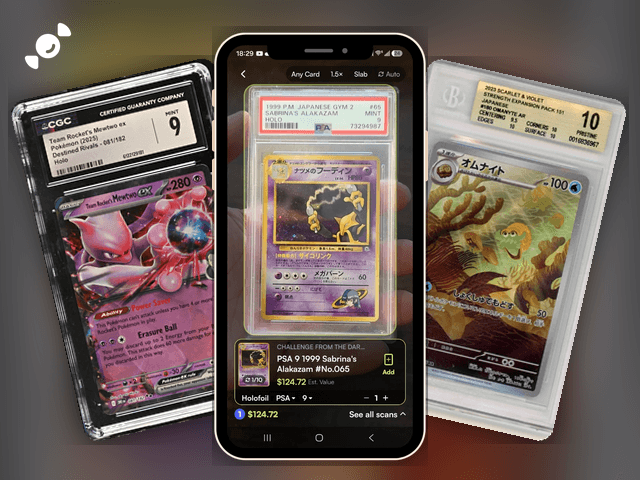
Yes. Rare Candy scans slabs in the same free scanner you use for raw cards, and it supports PSA, CGC, BGS, and TAG. Point it at the slab, let it recognize the card, and it reads the grader and the grade, then pulls up an estimated value so you can see what that slab is worth right now. We tried it on a PSA 9 1999 Japanese Gym Sabrina's Alakazam, and it identified the card, the grade, and the value in one pass.
That's less common than it sounds. When we compared the five biggest scanner apps in our Top 5 Best Pokémon Card Scanner Apps test, Rare Candy was the only one that scans slabs for free with unlimited scans. Full disclosure, it's our app. But the table below doesn't leave much room for argument.
Which grading companies does the Rare Candy scanner read?
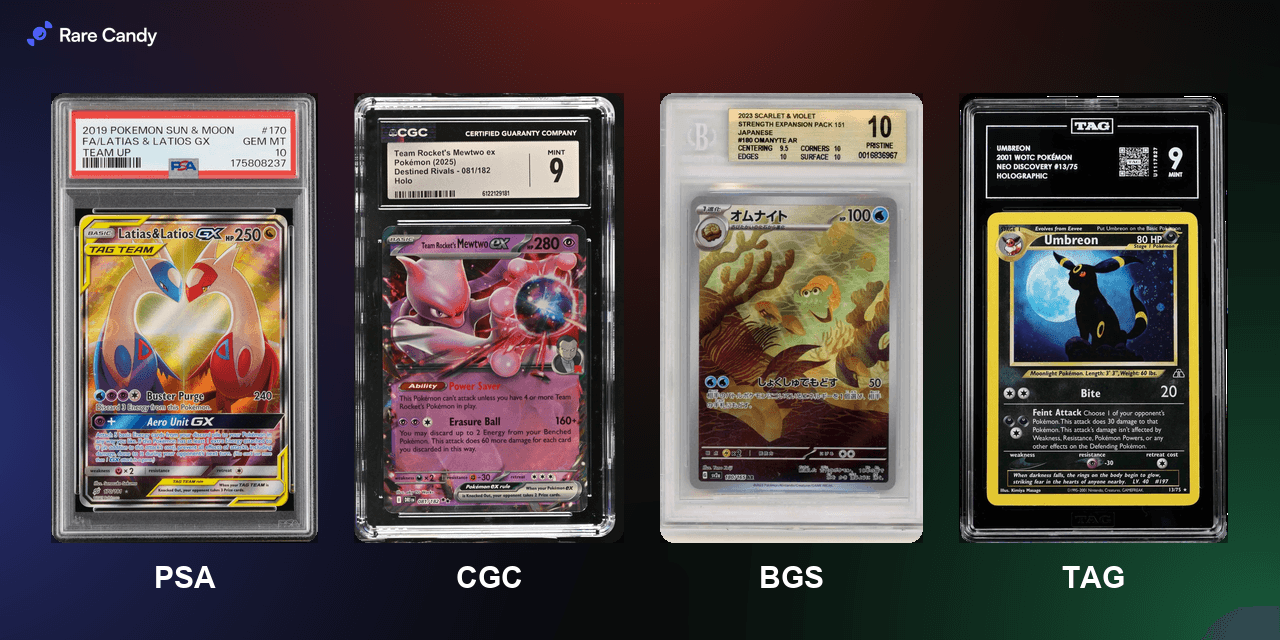
The scanner reads slabs from four grading companies:
PSA, the biggest name in the hobby. New to it? Start with our guide to grading with PSA.
CGC, a favorite for Pokémon. Here's our CGC grading guide.
BGS (Beckett), known for its subgrades. Our Beckett guide covers how it works.
TAG, the newest of the four. Check out our TAG grading guide.
Not sure which one to use for your own cards? Our guide to card grading services breaks down the differences.
How to scan a graded card slab with Rare Candy
Step 1: Open the scanner. Tap into the scanner in the Rare Candy app.
Step 2: Switch to Slab mode. The scanner has a Raw mode and a Slab mode, and picking the right one makes it much more accurate. Open the mode setting in the bar at the top of the scanner and choose Slab.
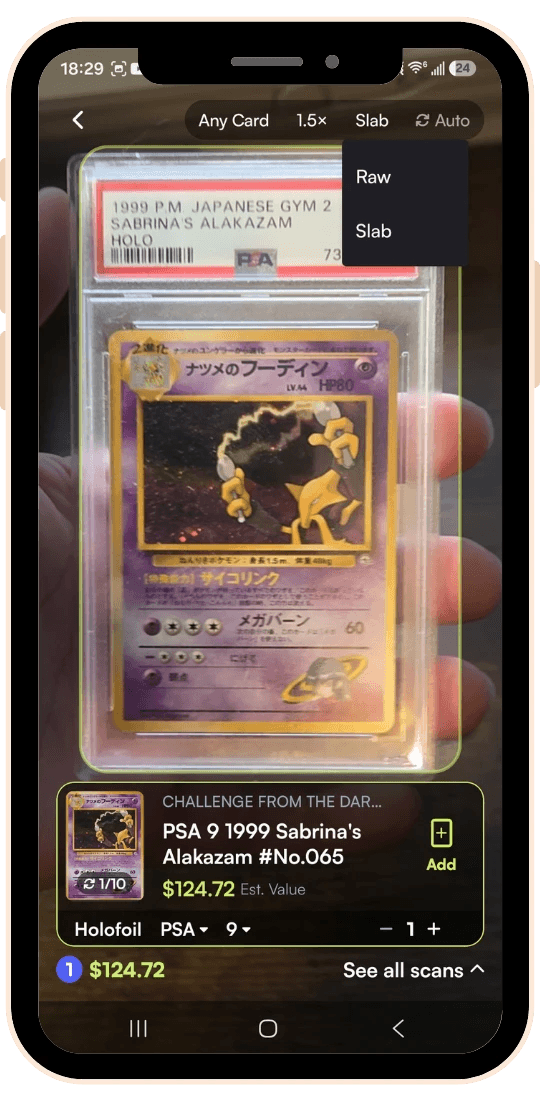
Step 3: Line up the slab. Hold the slab so the card fills the frame, or leave Auto on, which works in Slab mode too, so it captures the card once it's lined up.
Step 4: Check the result. You'll see the card and set, the grader and grade the scanner read, the finish, and an estimated value, with a running total for your scan session. If the scanner picked a different grade than the one on your slab, change it in the grade dropdown and the value updates to match.
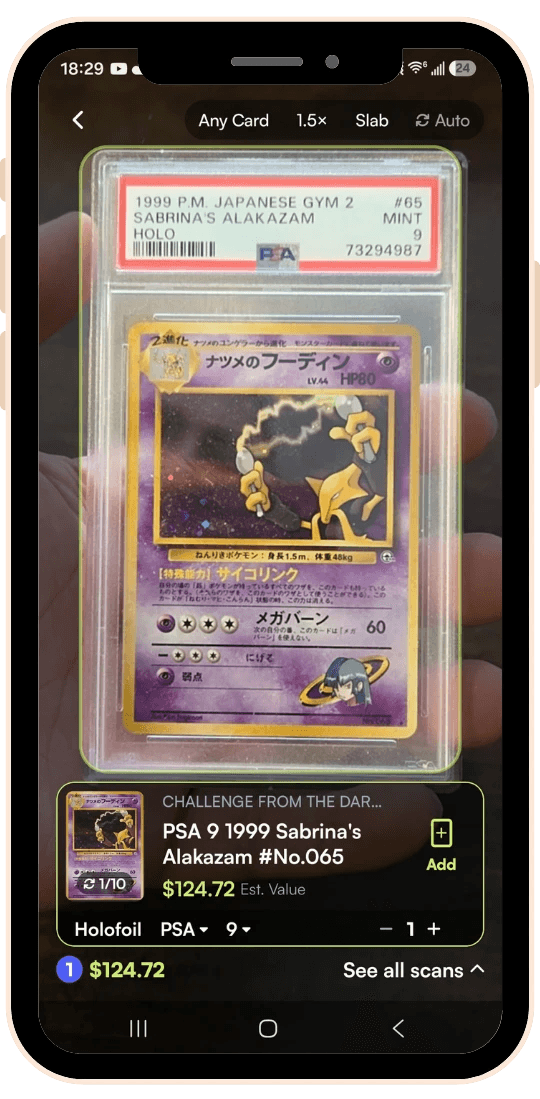
Step 5: Add it to your collection. Tap Add, and the slab joins your collection with everything else you've scanned.
Got a whole shelf of slabs to log? Leave the scanner in Slab mode and work through the stack. We built auto-scan for bulk sessions, so you can skip the tap between cards.
What do you get after you scan a slab?
The scan is just the start. Here's what Rare Candy does with a graded card once it's in the app:
An estimated value on screen. You see what the slab is worth as soon as the scan lands, and it changes when you pick a different grade from the dropdown, so you're not bouncing between apps and price sites. Want the full story on checking prices? Here's how to find the real value of your Pokémon cards fast.
Quick Product Lookup. Tap a card for a pop-up with its details and market value, plus quick actions like adding it to your collection or want list. See everything in the scanner update.
Collection value tracking. Collection Insights adds up your portfolio value from live market prices, so you can see whether your collection is up or down. Here is how to track your whole collection.
Grade Worthy. This feature looks at the gap between a raw card's price and its PSA 10 price, so you can spot which raw cards might be worth sending in.
Which Pokémon card scanner apps scan graded slabs?
Here's how the five biggest apps stack up on slabs, pulled from our full comparison:
Rare Candy | Collectr | TCGplayer | PriceCharting | Dex | |
Graded slab scanning | Yes, free | Limited | No | Graded prices, no slab scan | No |
Scanning cost | Free, unlimited | Free tier, PRO for unlimited | Free | Free with ads, paid for unlimited | Dex+ only |
Collectr's slab scanning is inconsistent according to reviewers, TCGplayer and Dex don't read slabs at all, and PriceCharting shows graded prices without scanning the slab itself. Rare Candy is the one that scans the slab, shows the value, and doesn't ask for a subscription. That's why we call it hands down the best graded card scanner, and the full Top 5 breakdown has every app's strengths and weak spots, ours included.
Is Rare Candy a card grading app?
Not exactly. Rare Candy doesn't grade your cards from a photo, and it doesn't submit them to PSA or any other company. It's built for what comes after grading: scanning slabs, seeing their value, and tracking them in your collection. Grading companies have their own apps for submissions and cert lookups, and our PSA grading guide walks through that process step by step.
Where Rare Candy helps before you grade is Grade Worthy, which compares a raw card's price to its PSA 10 price. And if you want to understand what graders look for, our condition guide covers NM, LP, MP, and HP.
Graded card scanner FAQ
What is the best app to scan graded Pokémon cards?
Rare Candy. It scans PSA, CGC, BGS, and TAG slabs for free with no scan limit, and it pulls up the graded value. In our test of the five biggest scanners, it was the only one with free, unlimited slab scanning.
Can I scan PSA slabs for free?
Yes. The Rare Candy scanner is 100% free with unlimited scans, and that includes PSA slabs. There's no scan cap, no paywall, and no upgrade pop-up in the middle of a stack.
Does Rare Candy scan CGC, BGS, and TAG slabs too?
Yes. Rare Candy supports slabs from PSA, CGC, BGS, and TAG. You pick Slab mode in the scanner, and it works the same way for all four.
Can I scan Japanese graded cards?
Yes. The Rare Candy scanner reads English and Japanese Pokémon cards, and that includes graded Japanese slabs, like the PSA 9 1999 Japanese Gym Sabrina's Alakazam we scanned while testing.
Does Rare Candy show PSA 10 prices?
Yes. On the scan result, pick a different grade from the dropdown and the estimated value updates. Grade Worthy also compares a card's raw price with its PSA 10 price to show you which cards have grading upside.
Is Rare Candy a card grading app?
No. Rare Candy scans and values graded cards and tracks them in your collection, but it doesn't grade cards or handle submissions. For that, use the grading company's own app or website.
What is the best card grading app?
It depends on what you need. To submit cards for grading, use the grader's own app. To scan slabs, see their value, and track your collection for free, Rare Candy is the best choice.
Start scanning your slabs
Got slabs sitting on a shelf? Download the free Rare Candy scanner, switch to Slab mode, and see what your graded cards are worth. And if you want the full picture before you pick an app, read our Top 5 Best Pokémon Card Scanner Apps test.
Scan your slabs for free with the Rare Candy app.