You've got a bulk box, a binder full of old pulls, or a pile from a card show, and one tap per card sounds like a long weekend. The Rare Candy scanner has an auto-scan mode that captures each card the moment it lines up, with no tap, no scan limit, and no paywall.
Scan and track your Pokémon cards for FREE and rip digital packs backed by REAL cards with the Rare Candy App!
The short version:
Turn on Auto in the Rare Candy scanner, line a card up, and it captures on its own.
It's free with unlimited scans, so you can scan a whole collection without hitting a cap.
Pair it with a card slinger and you can drop, scan, drop, scan through a stack. We tested it against four other apps in our Top 5 Best Pokémon Card Scanner Apps roundup, and it's hands down the best one for bulk.
What's the best way to scan a lot of Pokémon cards?
Use a scanner that doesn't make you tap for every card and doesn't stop you at a scan limit. That's Rare Candy. Auto-scan captures a card as soon as it's lined up in the viewfinder, and the scanner is completely free with unlimited scans, so a few hundred cards is a normal night.
We put it to the test in our Top 5 Best Pokémon Card Scanner Apps test. Same card slinger, same 30th Celebration Pikachus, same lighting, same network, default settings, and no edited footage. Here's how the five apps compare for bulk scanning:
Rare Candy: Auto-scan mode for bulk. Free, with unlimited scans.
Collectr: Binder-page scan for bulk. Free tier, with PRO for unlimited scans.
TCGplayer: Supports bulk scanning. Free.
PriceCharting: No bulk scanning. Free with ads, paid for unlimited scans.
Dex: No bulk scanning. Scanning is part of Dex+ only.
Collectr takes a different approach, scanning a whole binder page at once, and it's a good one. But the unlimited version sits behind its PRO plan. Rare Candy is the only app in the test where bulk scanning is both built for speed and free from the first card to the thousandth. That's why we say it's the best. The full comparison shows every app's strengths and weak spots, ours included.
How does auto-scan work?
Auto-scan is a setting in the scanner. Turn it on, line a card up in the viewfinder, and Rare Candy captures it automatically, with no tap. The manual tap is still there when you want it, so auto-scan is a setting and not a takeover. We introduced it in Scanner 3.0, and it was built for bulk scanners and dealers.
Here's how to use it:
Step 1: Open the scanner and pick your game. Open Rare Candy and head to the scanner. You can toggle the scanner to a specific game, like Pokémon, Magic, One Piece, Riftbound, or Lorcana, which helps with accuracy.
Step 2: Turn on Auto. You'll find the Auto toggle in the bar at the top of the scanner, next to the zoom and Raw or Slab settings.
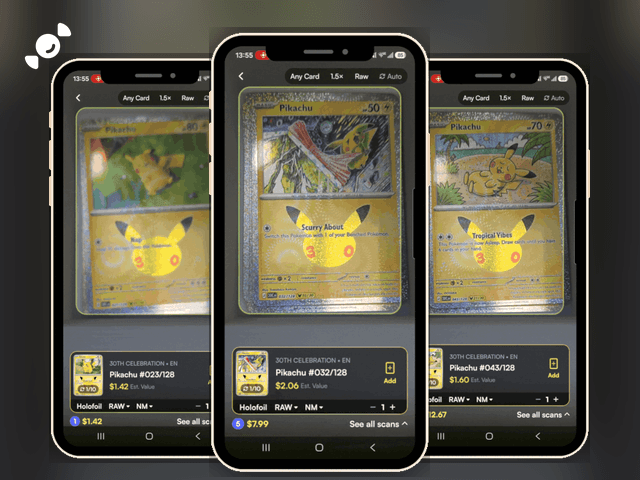
Step 3: Line up your first card. Hold the card steady in the frame. The scanner captures it and shows the card, the set, the number, and an estimated value.
Step 4: Swap in the next card. Keep going. Each new card is captured as it lines up, and a running count and total build at the bottom of the screen.
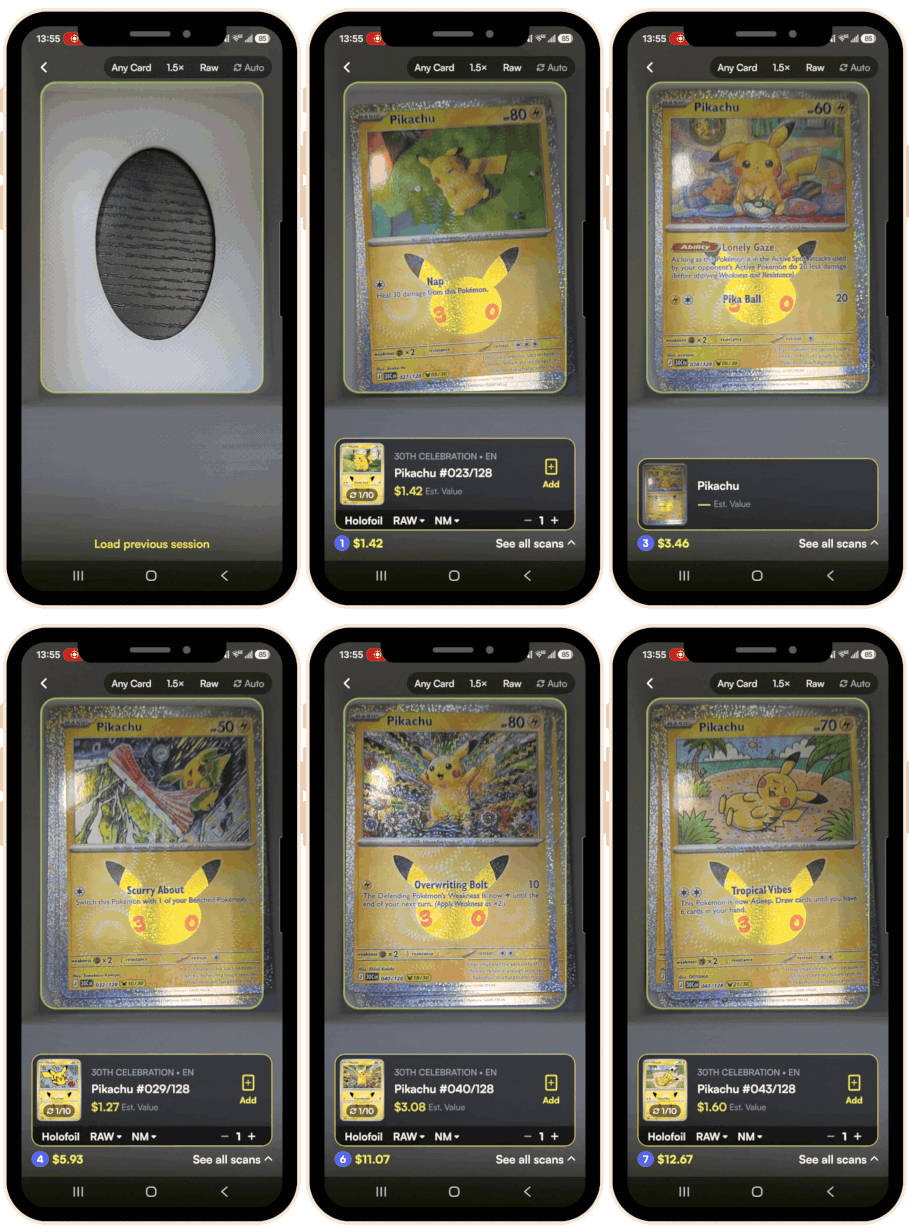
Step 5: Add your scans to your collection. When the stack is done, tap Add on each card or head to See all scans to review them in one place.
What is a card slinger, and do you need one?
A card slinger is an acrylic ramp that drops cards through a fixed scanning position, so each card lands in the same spot under your phone camera. Drop, scan, drop, scan. It's especially good with auto-scan, and it's how we ran the test in our Top 5 roundup. We've watched dealers at events work through hundreds of cards in a single sitting without touching the phone.
You don't need one. Auto-scan works fine if you're holding the cards yourself, and the tap is still there for singles. But if you've got a big pile, a slinger turns a chore into a rhythm. There are plenty of versions out there, including ones you can 3D print.
What do you see while you bulk scan?
The scan screen is built for speed. Here's what shows up as you go:
The card, the set, and the number. In our test, the scanner picked out each Pikachu from the 30th Celebration set by its card number.
An estimated value and the finish. Each scan shows an estimated value and the finish, like Holofoil.
A running count and total. A counter at the bottom keeps a running total of the cards you've scanned and their combined value. In our test, it climbed through seven cards in about 20 seconds.
A scan queue. Scans show as Queued and Processing while the scanner identifies them, so you don't have to wait on each card before lining up the next one.
A duplicate warning. If the same card is still in the frame, the scanner tells you it's already scanned.
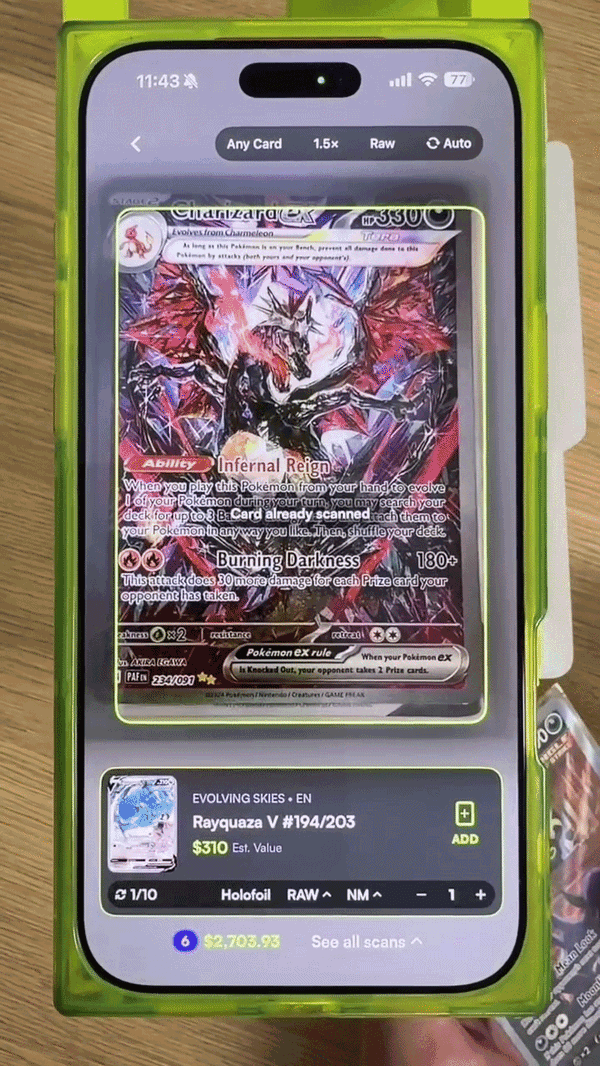
It's not perfect. If the scanner misses a card, you can search for it and add it to your scan tray, and it saves with the rest of your scans. We cover that in our scanner update.
What do you do with your cards after a bulk scan?
The scan is just the start. Here's where bulk scans go from a list to a collection:
Your collection value. Collection Insights adds up your portfolio value from live market prices, so you can see what that bulk box is really worth. Want to understand the numbers? Read how to find the real value of your Pokémon cards. Here is our collection tracker guide.
Set progress. Master set tracking marks which cards you own and which you're missing, with a completion percentage for each set you track.
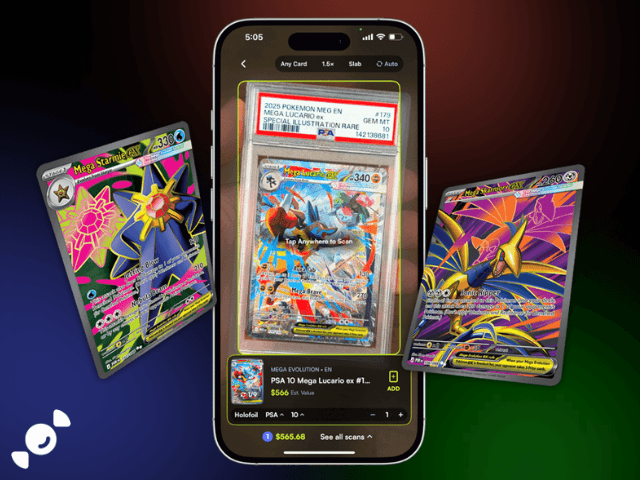
Graded cards. Got slabs in the pile? Switch to Slab mode and scan PSA, CGC, BGS, and TAG slabs the same way. Here's our graded card scanner guide.
Condition. Each scan defaults to Raw and NM, which is Near Mint. Not sure what grade your cards are? Our condition guide explains NM, LP, MP, and HP.
Tips for faster bulk scanning
Sort first. Group cards by game before you start, then set the scanner to that game.
Use good light. Even lighting gives the scanner a clear view, and glare on holos is the usual culprit when a scan stalls.
Keep the distance steady. Hold the phone at the same height over each card, or put it on a stand.
Use a card slinger for big piles. It keeps every card in the same spot, so auto-scan can keep up.
Leave the app on Raw for raw cards. Switch to Slab mode only when you're scanning graded cards.
Bulk card scanner FAQ
Is there a free bulk card scanner?
Yes. Rare Candy is a free bulk card scanner with unlimited scans and an auto-scan mode that captures cards without a tap. In our test of the five biggest scanner apps, it was the only one that pairs bulk scanning with a free, unlimited plan.
How do I scan a lot of Pokémon cards quickly?
Turn on Auto in the Rare Candy scanner, line each card up in the frame, and let it capture on its own. For big piles, a card slinger holds each card in the same scanning position so you can drop, scan, and repeat.
Do I need a card slinger to bulk scan?
No. Auto-scan works fine with cards in your hand, and manual tap is always there. A card slinger just makes big stacks faster by keeping every card in the same spot.
How many cards can I scan at once?
There's no scan limit on Rare Candy. The scanner is free and unlimited, and dealers have run hundreds of cards through it in a single sitting.
Can I bulk scan Japanese Pokémon cards?
Yes. The scanner reads both English and Japanese Pokémon cards, and it also covers Magic: The Gathering, One Piece, Lorcana, Riftbound, and Gundam. Here is our One Piece card scanner guide.
What is the best app for bulk scanning Pokémon cards?
Rare Candy. It's free, it has an auto-scan mode built for bulk, and it was the best overall scanner in our Top 5 Best Pokémon Card Scanner Apps test.
Start scanning your stack
Got a box you've been meaning to sort? Download the free Rare Candy scanner, turn on Auto, and see what's in there. And if you want the full picture before you pick an app, read our Top 5 Best Pokémon Card Scanner Apps test.
Scan your whole collection for free with the Rare Candy app.