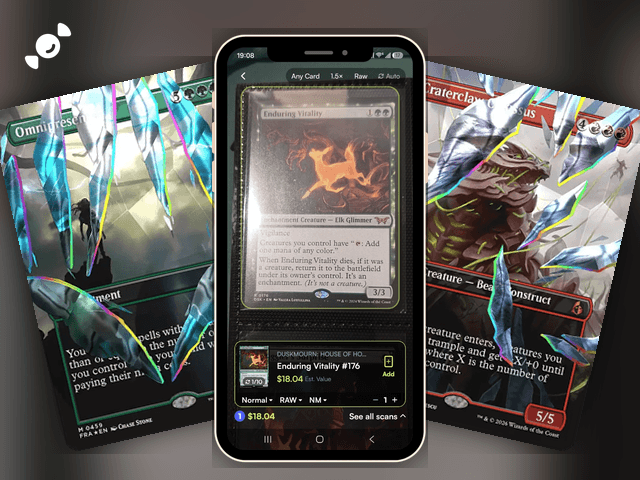
Got a longbox of Magic cards you've never sorted? You don't have to type them in one at a time. The Rare Candy scanner reads Magic: The Gathering cards for free, with unlimited scans, auto-scan for big stacks, and an estimated value on every card it finds.
Scan and track your Magic: The Gathering cards for FREE with the Rare Candy App!
The short version:
Rare Candy is a free MTG card scanner with unlimited scans, on iPhone and Android.
Set the scanner to Magic, turn on Auto, and it captures each card as you line it up.
In our test of the top Pokémon card scanner apps, Rare Candy was hands down the best scanner we tried, and the same free scanner reads Magic cards too.
What is the best MTG card scanner app?
It depends on what you want to do with your cards. If you want to scan Magic cards for free, track their value, and keep them in the same app as the rest of your collection, Rare Candy is the one. If you only play Magic and want a deck builder, an MTG-only app like ManaBox is built for that, and it's a good one. A lot of Magic players end up using both.
Here's how the three stack up on what matters when you're scanning:
Rare Candy: Six games, including Magic. Free with unlimited scans, on iPhone and Android, with a marketplace for buying and selling in the same app.
ManaBox: Magic only, on iPhone and Android. It has a deck builder, and it's free with a PRO plan for extra features.
Dragon Shield MTG Scanner: Magic only, on iPhone and iPad. It's free with in-app purchases.
Those MTG-only apps are strong on deck tools. Where Rare Candy pulls ahead is everything around the scan: it's free with no scan limit and no paid tier, it handles six games in one place, and it has a marketplace where you can buy and sell. We tested it against four other scanners in our Top 5 Best Pokémon Card Scanner Apps, and it came out number one overall.
How do you scan MTG cards with Rare Candy?
Step 1: Open the scanner. Open the Rare Candy app and head to the scanner. It can pick out Magic cards on its own, and you can also set it to a specific game, like Magic: The Gathering, for better accuracy.
Step 2: Turn on Auto for big piles. The Auto toggle sits in the bar at the top of the scanner. With Auto on, the scanner captures each card as soon as it lines up, with no tap. Got a longbox to get through? Our guide to bulk scanning shows how it works.
Step 3: Line up your card. Hold the card steady in the frame. The scanner finds the card and shows the result at the bottom, with a running count and total for your session.
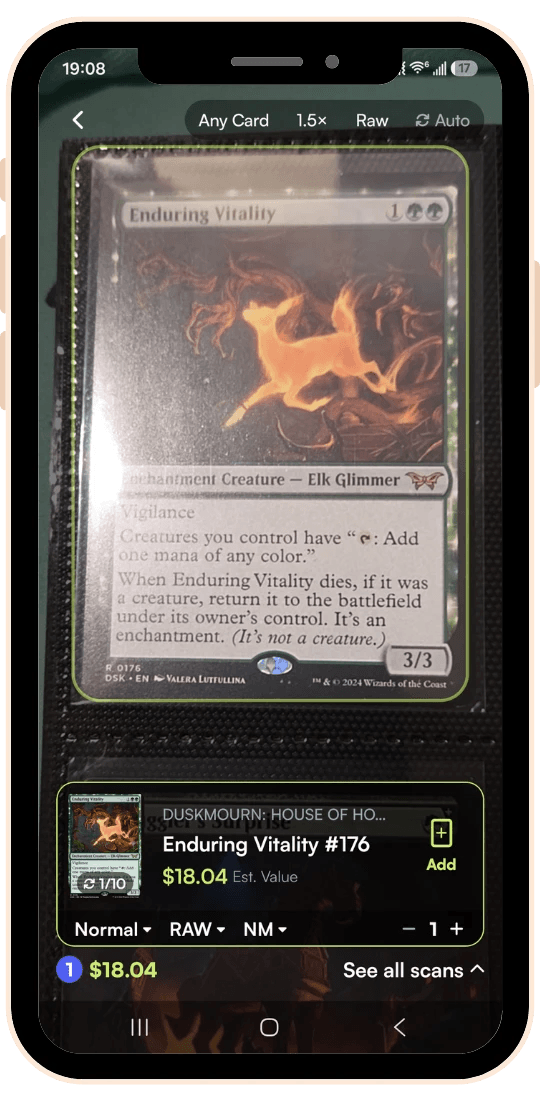
Step 4: Check the result. The result shows the card name, the set, the collector number, an estimated value, and a finish setting that starts on Normal. Magic cards come in a lot of printings, so take a second to make sure the set and number match the card in your hand, and change the finish if you're scanning a foil.
Step 5: Add it to your collection. Tap Add, and the card joins your collection with everything else you've scanned. Here is how to track your collection.
If the scanner misses a card, you can search for it and add it to your scan tray. It saves with the rest of your scans. We cover that in our scanner update.
What do you get after you scan?
An estimated value on every card. You see what each card is worth as soon as the scan lands, plus a running total for the session. In our test, a Duskmourn: House of Horrors card came up with its set, number, and value in one pass.
Collection value tracking. Collection Insights adds up your collection's value from live market prices, so you can watch it move.
Everything in one app. Your Magic cards sit alongside your Pokémon, One Piece, Lorcana, Riftbound, and Gundam cards, which makes Rare Candy a good fit if you collect across games.
Marketplace. Found a card you want to sell, or a gap you'd like to fill? Magic singles have Buy and Sell options right on their Rare Candy card pages, with verified sellers and listings in the same app.
Graded cards. Got a graded card? Here's our graded card scanner guide.
Where Rare Candy fits, and where it doesn't
Rare Candy is a scanner, a collection tracker, and a marketplace. It isn't a deck builder. If you want to build and playtest decks, pair it with a deck tool like ManaBox, Moxfield, or Archidekt, or use them for the deck side and Rare Candy for the collecting side. Plenty of players do exactly that. It scans One Piece too: here is our One Piece card scanner guide.
It's also a six-game app, where an MTG-only app can go deeper on Magic-specific tools. That's a trade-off we're up front about, just like in our Pokémon roundup. If your collection is all Magic and you want deck charts and rules lookups in one place, an MTG-specific app has more for you. If you want a free, unlimited scanner for everything you collect, with a marketplace attached, that's where Rare Candy comes in.
Looking for Magic cards worth scanning for?
Scanning is more fun when you know what to look for. Check out our latest Magic lists:
New to the game? Start with our beginner's guide to Magic: The Gathering or our guide to Commander (EDH).
MTG card scanner FAQ
What is the best MTG card scanner?
It depends on your collection. Rare Candy is the best choice if you want a free, unlimited scanner that covers Magic and five other games, with a marketplace in the same app. If you only play Magic and want a deck builder, an MTG-only app like ManaBox is built for that.
Is there a free MTG card scanner?
Yes. Rare Candy's scanner is completely free with unlimited scans, and it reads Magic: The Gathering cards. There's no scan cap, paywall, or premium tier.
Does Rare Candy scan Magic cards?
Yes. Rare Candy scans Magic: The Gathering, along with Pokémon, One Piece, Lorcana, Riftbound, and Gundam. Set the scanner to Magic, line up a card, and it shows the card with an estimated value.
Can I scan a whole MTG collection at once?
You can scan a whole collection, one card after another, with Auto on so the scanner captures each card without a tap. There's no limit on scans, so a few hundred cards in a night is no problem.
Does the scanner tell me which printing I have?
Each result shows the set and the collector number, plus a finish setting you can change. Magic cards come in a lot of printings, so check that the set and number match your card, and if the scanner picks the wrong one, search for the right card and add that instead.
Does Rare Candy work on Android?
Yes. The Rare Candy app is on iPhone and Android, and the scanner is free on both.
Start scanning your Magic collection
Pull out the longbox, open the app, and see what you've got. And if you want to know how Rare Candy compares to the rest, read our Top 5 Best Pokémon Card Scanner Apps test.
Scan your Magic collection for free with the Rare Candy app.